Curriculum
Past Paper Questions v2
Summative Assessment
01 Nov 2026
Exam Question System Overhaul
Exam questions can now be answered 1 at a time, rather than in batch - allowing for far greater accuracy and relevance in feedback. Questions are scored and students can use the instant feedback to make improvements. All of this data flows through to the group marksheet - also exportable to excel!
 Click to enlarge
Curriculum
UI Improvement
25 Oct 2026
Learning Resources - UI Pass
Learning Resources are now much more accessible, with colour coding allowing you to get to what you want much faster! No more clicking through accordions!
 Click to enlarge
Feature
Teacher Dashboard
25 Oct 2026
Teacher "Group Dashboard" improvement
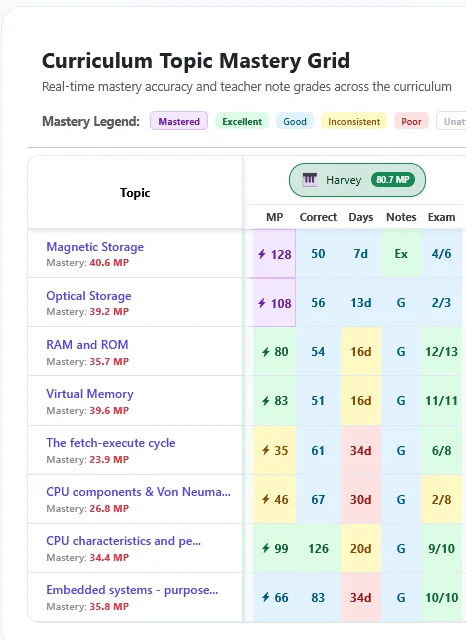
The Group Dashboard has been significantly improved, allowing teachers to have a single place where they can see for all students and topics: Number of questions answered correctly, Days since last answered, Notes quality & missing notes, Mastery Points (MP). All colour coded for ease of access and exportable to an xls spreadsheet.
System
Pastel Shades are here!
19 Oct 2026
Teacher Marksheet Improvement
I've converted the colour scheme for marksheets to pastel shades. MUCH easier on the eyes - a significant boost to readability of these important stats.
System
Auto Linking Students
18 Oct 2026
Class Management Improved
Bulk Import now recognises if a student exists elsewhere within Learning Mastery. If they do, they are added to the new group and when they login, they get to choose which course they are a part of. Previously, they needed a new username and password for each course they were a member of. This makes it much easier to course hop!
Feature
Upgrade
18 Oct 2026
Teacher Presentation V2
New tool landed. Teacher presentations can now include live data showing continually updated student progress within the "slide".
After teaching a segment, the teacher presentation (web based and embedded right into learning mastery) will show live updates of students progress on note taking and assessments. Without having to change screens at all, you will be able to see how your class is progressing at their note taking task. Live and interactive countdown timers are embedded within these pages so that students and staff can help keep pace high and everyone productive!
System
Teacher View
11 Oct 2026
Revision update
When a member of staff visits the Revise page, they will see the overall group view rather an individual students. This allows staff members to quickly see general areas of strength and weakness a group at a time.
Feature
AI Chat
04 Oct 2026
AI Chat in MCQ
AI chat is now embedded right into Multiple Choice Questions. Students can now have a learning conversation with a AI chat bot which comes packed with curriculum knowledge about the qualification, topic and exam questions related to it.
Feature
Group Deletion
04 Oct 2026
Group Management
It is now possible to delete an entire group of student at a time when logged in as a school leader.
Deleting all students from a group is a huge time saver, but only to be undertaken with great care. Deletion is a non-reversable process. Staff have the option to download a copy of all student notes as part of this process.
System
Live View Improved
04 Oct 2026
Live View
Teachers who use Live View to monitor student progress in a lesson, can now see a live and updated view of student note progression and AI assessments. Students notes are colour coded by grade and the teacher can click to see the note content as well as the feedback received.
System
Dashboard Upgrade
04 Oct 2026
Student Dashboard
When students log in, their landing page will more clearly identify where they have any missing, poor or inconsistent notes as well as any topics that they have not yet answered sufficient multiple choice questions for. This makes it much easier to track progress & performance.
Feature
Support Staff
04 Oct 2026
TA / Support Staff role
Your school leader can now create TA / Support staff roles!
These staff members can see student notes, can view the group dashboard as well as student dashboards. They have very similar access rights to teachers, but are unable to mark student notes.
Curriculum
Feedback++
04 Oct 2026
Feedback Improved!
AI assessment system has been significantly improved for students.
Once a note is saved, it will be instantly assessed. The feedback provided is now much more constructive and includes concrete guidance for what to do next. Students can make changes and resubmit any single note 4 times per hour.
Feature
Curriculum
Progress
02 Oct 2026
Teacher feature - mark as taught
Teachers can now mark entire curriculum sections as taught in one go.
No need to click on 8 individual sub-topics. Teachers can now mark all topics within a section of the curriculum as taught in one click.
Glossary
Feedback included
02 Oct 2026
Notes Export improved
Exporting your notes from learning mastery now also includes all feedback you have ever received!
Students can use this as a single overall notes document to use as a revision aid, containing all their highly structured notes and feedback. Teachers can use this as evidence of assessment and monitoring of progress.
Feature
UI improvement
01 Oct 2026
Student Dashboard
The student dashboard has had a significant rework. Core, important information is presented more clearly and students (and teachers) can now click through each profile with much greater ease.
Feature
Note Taking Improvement
Scaffolding
27 Sep 2026
Key Vocab
Students can now see what key vocab should be included in each note. Once the term has been included, they get a subtle animation for each.
Providing a list of key vocab for each note will substantially support students who may struggle with an initially blank note taking area. As they include each key term, they receive positive reinforcement as each turns green and performs a little happy animation!
Feature
Exemplar Notes
Note Taking and Planning
27 Sep 2026
Teacher viewable exemplar notes
The addition of exemplar notes, built into learning mastery will help teachers to plan their teaching, ensuring that they address all the required content for each topic. Gaining an appreciation of what GREAT note taking looks like can help to support students.
Great notes are based on insights from all past paper questions for that topic. The notes headers and exemplar notes support students by ensuring that they are fully equipped with all the knowledge that they need to succeed.
Feature
Major improvement
AI
27 Sep 2026
AI note marking
Once student complete a theory note, it is marked immediately. Students receive instant grading along with 1 strength identified and praised and one area for development detailed.
Students do best when they receive rapid, high quality feedback. Notes are assessed against an exemplar note (available to teachers) for each header. This ensure that what they produce is assessed against an ideal standard.
When all notes for a topic have been completed, the overall topic is automatically assessed based on the mini assessments. Students may make improvements to notes for reassessments at any time.
Feature
New Feature
27 Sep 2026
Sensory & Focus Preferences: Low-Stimulus Mode
Students can now customize their practice experience with Calm Focus Mode, replacing intense confetti and animations with subtle, gentle feedback.
We have introduced customizable sensory settings under Profile & Preferences. For students who experience cognitive overload from particle bursts and screen animations, Calm Focus Mode disables confetti and heavy visual effects entirely, providing a quiet, accessible confirmation indicator.
Careers
Careers Hub
25 Sep 2026
Interactive Careers & Real-World Industry Profiles
Explore newly added career pathways, real-world salary ranges, required skills, and qualification routes directly within your subject book.
Head over to your Subject Book to discover connected industry roles for every topic — from Cybersecurity Analysts and Cloud Architects to Game Engineers. Each profile highlights entry routes, key industry certifications, and how course concepts apply in industry.
Curriculum
Curriculum Update
22 Sep 2026
Curriculum Expansion: Enhanced Keyterms & Exam Questions
Expanded practice coverage across primary topics with updated multiple-choice questions, exam-aligned mark schemes, and glossary keyterms.
New past-paper style questions and detailed explanations have been added to reinforce retrieval practice and topic mastery across the syllabus.